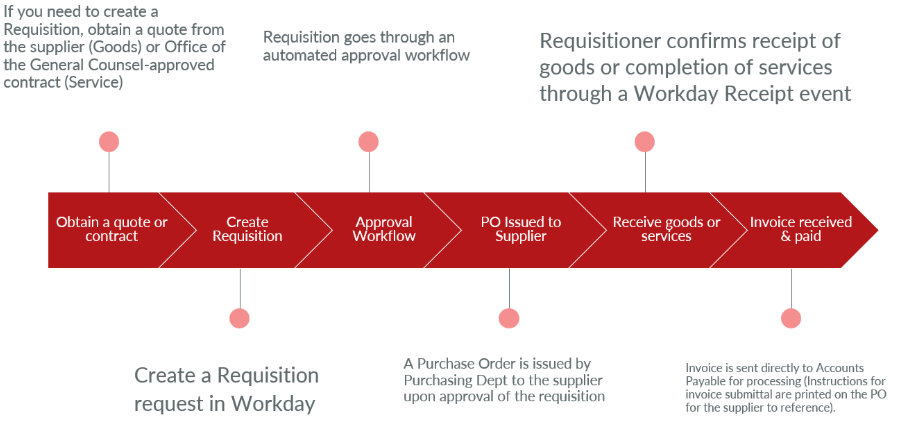
For anticipated spend of $5,000.00 and higher, SCU requires that a Purchase Order (PO) be issued to the supplier before any work begins. The process begins with the end user submitting a [Purchase] Requisition.
Getting Started
What services/goods require a requisition?
- Any contract/proposal/statements of work/MOU or quote/bid with a total value of $5,000.00 and higher
- Punchout supplier orders
- Bon Appetit catering
- When the vendor requires a PO to begin services or fulfillment of the order, regardless of the dollar amount of spend.
For the Best Purchasing Experience
- Plan ahead!:
- If you know that your planned purchase requires a PO, kick off the requisition process in Workday right away using your quote/bid or fully approved and executed contract/proposal so that there is enough lead time for approvals.
- If your supplier is not yet registered in Workday, kick off the Supplier Registration Request (SRR) process right away.
- Collaborate with Procurement to determine if one of our existing suppliers can fulfill your requirements. SCU has contract pricing with certain suppliers, so you may realize some cost savings.
- Utilize punchouts:
- Punchout suppliers should fulfill most of your general supply needs.
- Punchout payments are centrally managed, so you won’t have to reconcile expenses or spend out of pocket.
- Note: P/T Cards should not be used for suppliers that are set up with Punchout (Amazon, Staples, Blaisdell’s, etc.). Punchout pricing is contracted pricing that we benefit from.
- Create one requisition for the entire fiscal year for recurring charges or the full contract value:
- If you will be billed by a supplier multiple times throughout the year, you can create one requisition for the entire annual or quarterly cost (e.g. Bon Appetit, temp agencies, etc).
- All departmental spending approvals take place once at the requisition stage, rather than per invoice or payment request.
Creating a Requisition
Requisitions are internal orders meant to communicate the need for goods/services to support the University's business and academic activities, and do not represent any spend commitment to a supplier. Requisitions ensure that all necessary spend approvals are in place before committing the University to a purchase, that the purchase is in compliance with best practices and policies, and that the best value option is selected.
How do I create a Requisition?
Note: Only those assigned to the Requisition Requester security role can create requisitions. You can request access via the Workday Financials Security Request Form.
Requisitions are submitted in our Workday Finance system through the “Create Requisition” task. Below are printed guides on this process:
What do I attach to the requisition?
- The full executed contract/proposal or price quote/estimate/bid (whichever applies)
- IRB protocol and approval letter (if purchasing gift cards for research participants).
- Contextual emails or correspondence that may be helpful for approvers or for the Procurement team.
Note: Please make sure that any contract has been reviewed and approved by the Office of the General Counsel before circulating for signatures and then attaching it to the requisition. Not following this process may result in delays in approving your requisition.
Who does a requisition route to after it is created?
Requisitions go through an automated spend approval process, with approvers depending on the dollar amount of the order. Once internal approvals have been completed, the requisition will then be routed to SCU Procurement for final review and approval. Once approved, a purchase order is then issued to the supplier, representing the commitment to purchase and the approval to begin services or processing/delivery of goods.
For more information on the spend workflow, please refer to this flowchart.
Can my supplier begin work once I create a requisition?
No, the supplier should only begin working on your order once a purchase order has been issued from your approved requisition.
Purchase Orders
Once a requisition has been approved by SCU Purchasing, a purchase order (PO) is generated and issued to the supplier. This represents both the commitment to purchase and the approval to begin services or processing/delivery of goods.
Will I be notified when a PO has been issued?
Yes, the requester on the source requisition will receive an automated notification from Workday once a purchase order has been issued.
What happens once a PO has been issued for my requisition?
A PO gives the ‘go-ahead’ to the supplier to begin working on your order.
Per the instructions on SCU’s purchase orders, the supplier is expected to:
- Abide by SCU’s standard Purchasing Terms & Conditions (unless a separate agreement has been agreed to and signed by both parties)
- Provide an order confirmation to SCU Purchasing and tracking information if fulfilling a goods order.
- Remit the subsequent invoices directly to SCU Accounts Payable for processing
The requesting department is responsible for:
- Inspecting the package for damages and correctness that may not have been obvious to Central Receiving.
- Informing SCU Purchasing if an order:
- Has not been fulfilled yet if the quoted lead time has been surpassed.
- Has been canceled so that the PO can be canceled in the system.
- Has been modified, and therefore, a change order is needed (see section on PO change orders)
- Transacting the Receipt for the PO in Workday once services have been rendered.
What happens if there is a problem with my order?
If there is an issue with your Amazon order, submit a return or replacement directly with Amazon.
For non-catalog orders, raise any issues with damaged goods directly with the supplier as soon as they are identified. Include the Purchasing team member who issued the PO in any communications.
Do POs result in budget encumbrances?
Yes, issued POs are reflected as spend obligations from the department’s budget. Workday encumbers and ‘reserves’ the budget for anticipated invoices and payments against the PO (Ex: A $25,000.00 purchase order will “reserve” $25,000.00 of the department’s budget for future payments).
How does my order get paid?
For non-catalog purchases, the invoice(s) should be sent directly to SCU Accounts Payable at AccountsPayableHelp@scu.edu with the PO# referenced on the invoice.
- Before an invoice can be scheduled for payment, a Receipt typically needs to be entered against the corresponding PO in order to clear the ‘match exception’ (See the section on Receipts).
Payments for punchout POs are managed centrally within the University Finance Office, so no further action is typically required by the requester to get the order paid.
Closing Purchase Orders
A purchase order is closed when all expected activity and invoicing have been completed. SCU Purchasing conducts monthly and fiscal year activities to close purchase orders, but it is also expected that departments are keeping track of their open POs and spend obligations, and request that Purchasing close POs as appropriate.
When is it appropriate to close a purchase order/purchase order line?
- All expected services/goods have been received and invoiced for.
- All anticipated invoices have been processed and cleared from match exception for payment.
- The purchase order has been fully received and paid (Workday will automatically close purchase orders that meet these criteria).
- The purchase order has an open spend obligation/balance that can be closed and unencumbered from the department’s budget.
Who is responsible for closing purchase orders?
SCU Purchasing is the department with access to close purchase orders in Workday. Though they will close out purchase orders that can clearly be closed, departments are also expected to keep track of their open purchase orders and spend obligations, and notify Purchasing as to which can be closed.
Can a closed purchase order be reopened?
Yes, a purchase order can be reopened if the fiscal year it was closed in is still open for procurement activities. (Ex: A purchase order closed in fiscal year 2025 can still be opened if the fiscal year 2025 procurement is still open).
Once the fiscal period the purchase has been closed in is closed for procurement activities, the purchase order can no longer be reopened. This typically happens once the previous fiscal year has been fully closed out and the new fiscal year begins.
What happens to purchase orders that Purchasing is not able to determine need to be closed?
Purchase orders that Purchasing is not able to determine need to be closed may be rolled forward into the new fiscal year, and will then obligate the department’s budget.
Change Orders for Purchase Orders
Change orders are approved modifications to an existing purchase PO to modify the dollar amount, date extensions, changes of scope, etc.
Change orders can be requested to:
- Increase/decrease the dollar amount for a PO for valid reasons within the scope of the original contract/agreement, or for an amended agreement.
- Change the quantity or unit price on a PO line validated by an updated quote or proposal.
- Cancel a PO line or the entire purchase order
Change orders cannot be submitted if:
- The original contract that the PO was issued for expired. If there is a new contract, a new PO should be issued.
- The PO has been closed
How to request a change order
To request a change order to an existing PO, email Purchasing@scu.edu and provide the following:
- Supplier name
- PO number
- Change request (dollar amount, quantity, unit price, etc.)
- Full Workday budget string/worktag information (if modifying dollar amount)
- Backup documentation (updated SOW, contract, quote, etc.)